 HomeMaxxing
Your home, reimagined from a single photo.
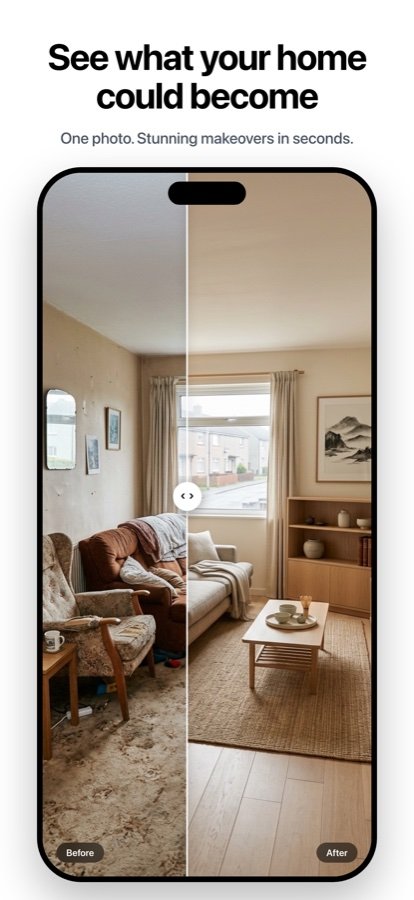
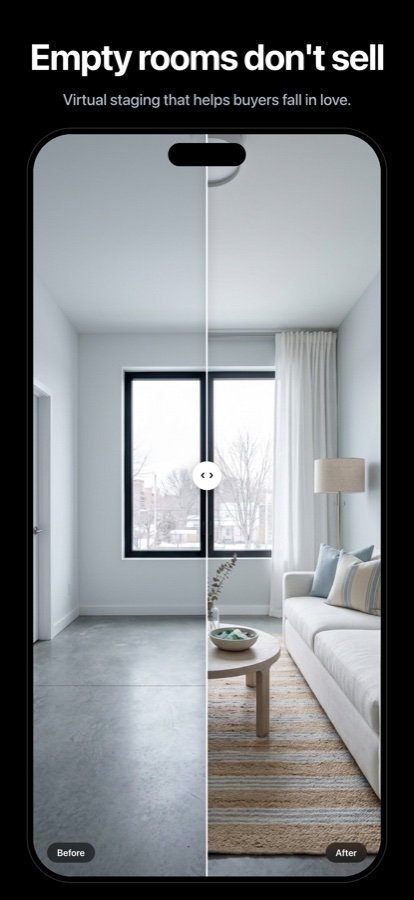
HomeMaxxing turns one photo of any room — or your home's exterior — into photorealistic AI interior design, virtual staging and clutter-free listing photos. Walls and windows stay put; the style transforms.
- Free starter credits
- No subscription
- Photorealistic results in seconds
 Ready in seconds3 credits per design
Inside the app
One photo in. Six ways to fall in love with your home again.
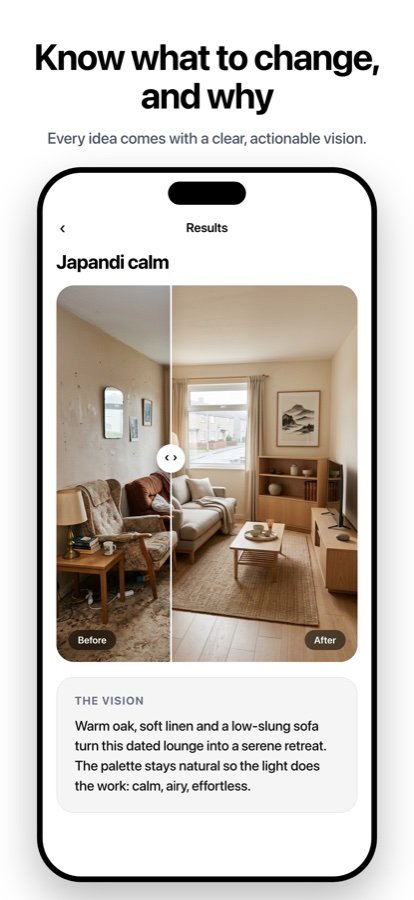
Every render keeps your room's real geometry — it looks like your home, because it is your home.
How it works
Point. Shoot. Redesign.
No floor plans, no 3D modeling, no learning curve. If you can take a photo, you can redesign a room.
Snap a photo
Any room, facade, terrace or garden. One regular iPhone photo is all the app needs — no measurements, no scanning.
Pick a direction
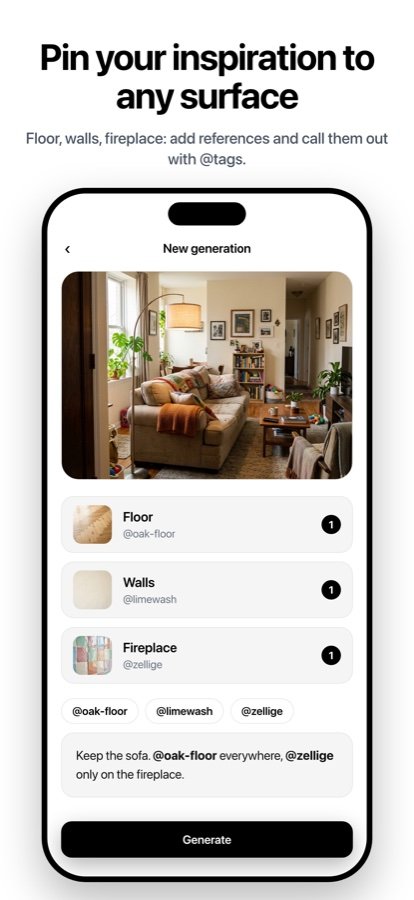
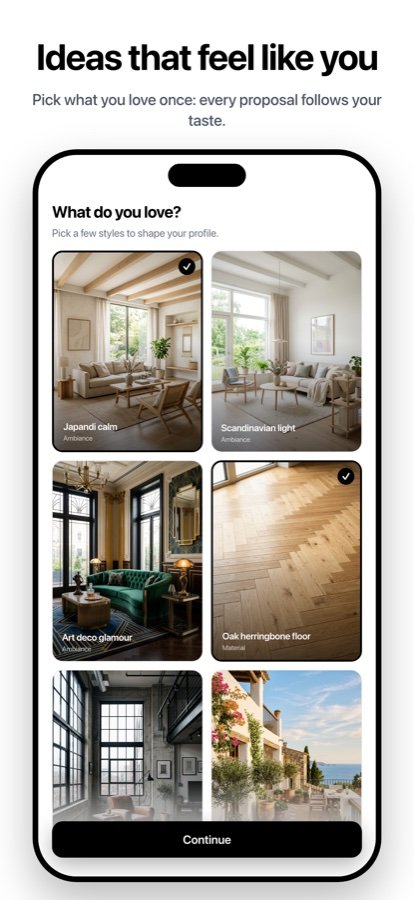
Get several distinct, photorealistic design directions. Pin an inspiration photo or a material and every proposal will honor it. Save or dismiss — the app learns your taste.
Refine until it's perfect
Keep the style, adjust the details: warmer wood, fewer objects, more plants. Or run Tidy Mode for spotless, listing-ready real-estate photos.
No subscription
Free starter credits, then one-time packs. One design = 3 credits. Failed renders auto-refunded.
Made for real estate
Tidy Mode declutters and stages listing photos in one minute — furniture untouched.
Indoor & outdoor
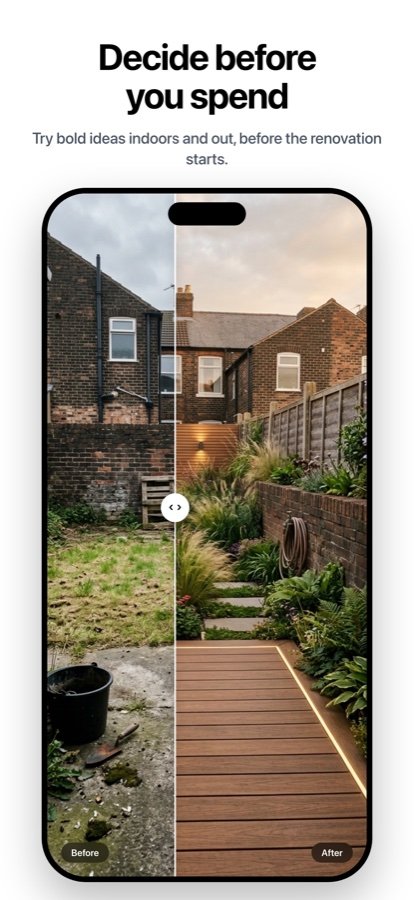
Living rooms, kitchens, bedrooms — plus facades, gardens and terraces.
Private by design
Photos used only for your designs. Location data stripped. Delete everything anytime.
Guides
Learn what AI can do for your home
Practical, no-fluff guides — from staging a listing to redesigning your garden.
AI Interior Design From a Photo
How one photo becomes a full photorealistic redesign — and why geometry matters.
Read the guide → Real estateVirtual Staging for Real Estate Agents
Stage listings in minutes, stay MLS-compliant, and sell faster.
Read the guide → SellingHome Staging With AI
Why staged homes sell faster — and how to stage yours with your phone.
Read the guide → Tidy ModeDeclutter a Room for Listing Photos
Remove clutter from photos without moving a single box.
Read the guide → MakeoverAI Room Makeover, Zero Purchases
Try bold styles on your real room before buying anything.
Read the guide → RenovationVisualize a Renovation Before You Remodel
See finishes, colors and layouts on your actual room before the work starts.
Read the guide → ExteriorAI Exterior Home Design & Curb Appeal
Test paint, cladding and landscaping on your facade from one photo.
Read the guide → GardenAI Garden & Backyard Design
Turn a bare yard photo into realistic landscaping directions.
Read the guide →FAQ
Questions, answered
Can AI redesign a room from just one photo?
Yes. HomeMaxxing turns a single photo of any room into several photorealistic design directions in seconds. Walls, windows and layout stay exactly where they are — only the style, colors, furniture and mood change. Learn more
What is virtual staging and does it really help sell a home?
Virtual staging digitally furnishes and styles a property photo so buyers can picture themselves living there. Industry studies show staged homes tend to sell faster and closer to asking price — and virtual staging costs a fraction of physical staging. Learn more
How do I stage my home with AI before selling it?
Photograph each room as it is, run Tidy Mode at the listing-ready staging level, and export the results. Furniture stays untouched, clutter disappears, and the room reads clean and spacious. Learn more
Can I remove clutter from listing photos without moving anything?
Yes. Tidy Mode cleans up a photo at three levels — quick tidy, deep clean, or listing-ready staging — while keeping the actual furniture and the room's geometry exactly as photographed. Learn more
How can I try a new interior style without buying furniture?
Take one photo and HomeMaxxing proposes several distinct design directions for the same room. Save what you love, dismiss the rest — the app learns your taste and every refinement stays true to the direction you picked. Learn more
Can I preview a renovation before starting the work?
Yes. Because HomeMaxxing keeps walls, windows and volumes in place, you can preview realistic finishes, colors and furnishings on your actual room before committing to a remodel budget. Learn more
Does AI home design work on exteriors and facades?
Yes. HomeMaxxing redesigns facades, terraces and outdoor areas from a photo — an easy way to test curb-appeal upgrades like new paint, cladding or landscaping before spending a cent. Learn more
Can AI design my garden or backyard?
Yes. Photograph your garden, terrace or backyard and get realistic landscaping directions — planting, layout and mood — while the space stays recognizably yours. Learn more
Is HomeMaxxing free? Do I need a subscription?
There is no subscription. You start with free credits; one design costs 3 credits and failed renders are refunded automatically. Buy a one-time pack when you need more, use it whenever you like. Get the app
What happens to my photos? Are they private?
Your photos are used only to create your designs. Location data is stripped from every photo, and you can delete your account and data anytime, right from the app. Learn more in the app
Contact
A question? Talk to a human.
Support, billing, privacy — write to us at support@homemaxxing.app and we'll get back to you quickly. We read every message.
Contact usFall in love with your home again.
Free starter credits. No subscription. Photorealistic designs in seconds — indoor and outdoor.